Selling electronics on Vinted
Phones, consoles, headphones, cameras and small appliances all sell on Vinted. Here is what is allowed, what to write, and how to get the device to the buyer safely, from Vinted's own help pages.
You can sell most electronics on Vinted, as long as the device is safe, not locked and not stolen. Say exactly which model it is, what comes with it and what does not work. Before you ship, remove your accounts, reset it to factory settings, switch it off and pack it well.
What you can sell in Electronics
Vinted's Electronics category covers phones, tablets and e-readers, TVs, headphones and speakers, consoles and games, smartwatches, cameras and lenses, laptops and computer parts, smart home devices, and beauty devices such as hair dryers and electric toothbrushes. Source: Electronics category: what you can sell
Some items can only be listed as new. These are memory cards, USB sticks, blank CDs and DVDs, film, printer ink and toner, heads for electric toothbrushes and razors, and batteries and power banks. Used or expired batteries and power banks are on that list too. Source: Electronics category: what you can sell
Small kitchen appliances go in the Home category instead. Kettles, toasters, blenders, coffee grinders and milk frothers are all allowed there. The same battery limit applies, so no device with a battery over 100 Wh is allowed. Source: Home category: what you can sell
What Vinted does not allow
A device can be refused for what it is, or for the state it is in. These are the main cases Vinted lists for electronics. Source: Electronics category rules
- Jailbroken or rooted devices, changed to get around the maker's security.
- Devices reported lost or stolen, or with a blocked IMEI number.
- Devices blocked by a carrier because of unpaid bills.
- Locked or pass-restricted devices.
- Devices with a swollen battery, or a battery over 100 Wh.
- Damaged devices that give off heat, or have frayed or loose cables or other damage.
- SIM cards listed on their own.
- Vape-related items, such as chargers, cables and batteries.
- Digital games, software keys and coupons.
- Devices not meant for the European Economic Area (EEA) market.
Vinted also bans recalled products, fakes, and devices changed so they no longer match what the maker sold. If you are not sure about an item, read the full page before you post it.
What to write in the listing
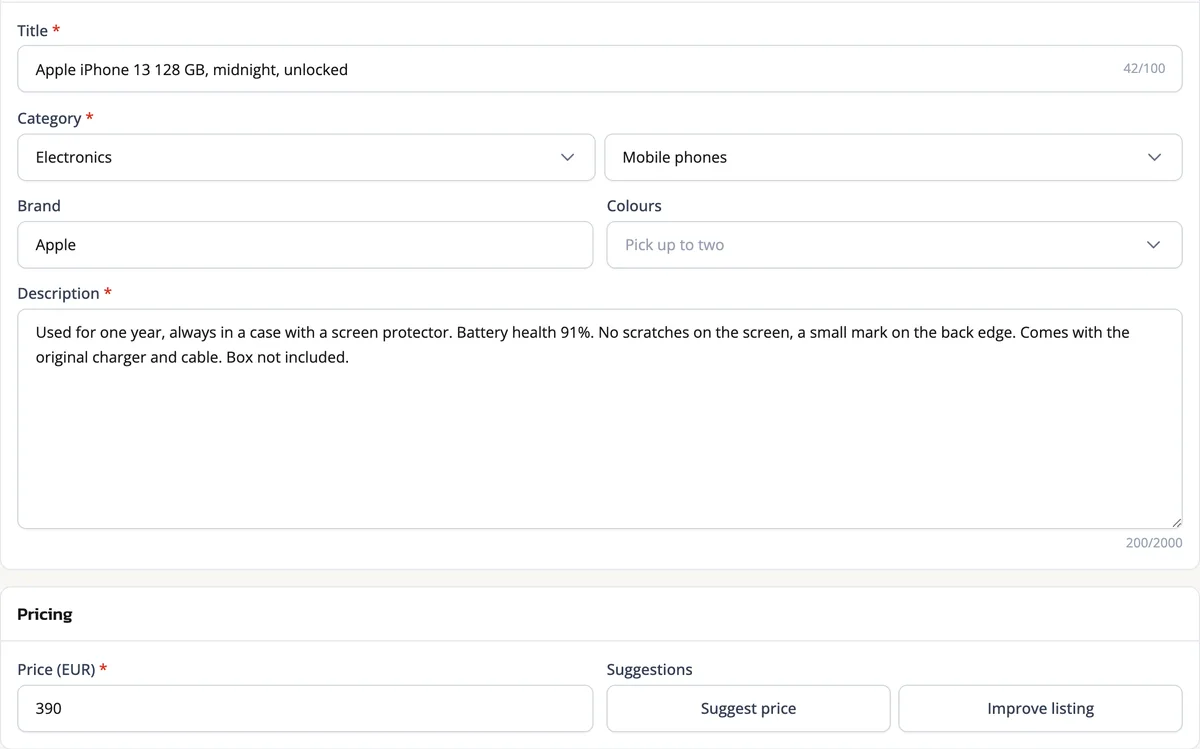
Vinted asks for good photos, the SIM lock status of a phone, the age rating of a video game, and, for an iPhone, the battery health shown in Settings. Source: Uploading electronics
The buyer cannot touch the item before they pay, so the listing is all they have to go on. These details help a buyer decide, so we would include them:
- The exact model, like iPhone 13 or PS5 Digital Edition, not just the brand.
- The storage, like 128 GB, for phones, tablets and consoles.
- The battery health, if your device shows it.
- What is in the box: charger, cable, controller, case, original box.
- What is missing, said plainly.
- Any fault, even a small one: a scratch on the screen, a dead pixel, a button that sticks.
Take a photo of the screen switched on, and one of each scratch. Say you sell a 150 EUR phone with a small crack. A clear photo of the crack in the listing is better than a buyer finding it when the phone arrives.
Choosing the condition, including Needs repair
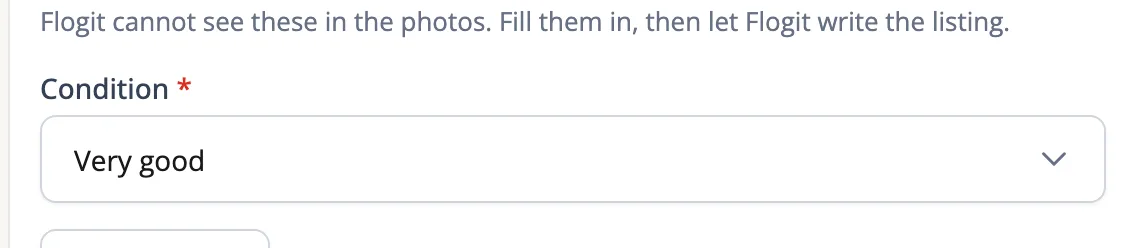
Electronics use the same conditions as other items, from New to Satisfactory. They also get one more: Needs repair. Vinted defines it as an item that no longer works as intended, with broken or missing parts. Source: Choosing item condition
Use Needs repair for a phone with a dead camera, or headphones where one side is silent. Vinted also asks you to describe each flaw in the listing description. Damaged or unsafe devices are still not allowed, whatever condition you pick. Source: Electronics category rules
Reset the device and remove your accounts
Vinted says you must disconnect all linked accounts and factory reset the device before you ship it. This protects your personal data, and the next owner needs a clean device. Source: Prepare your electronic items for shipping
Remove the device from your accounts
Sign in to your Apple, Google or Samsung account on any phone or computer. Open the list of devices and remove this one. On an Apple device, erase it in Find My first, then remove it from your account. That turns off Activation Lock.
Sign out and clear the extras
Sign out of the accounts linked to the device in its Settings, such as Apple ID or iCloud, or Google or Samsung. On a Nintendo console, remove the parental controls PIN. Unpair AirPods from your iPhone, iPad, Mac and other devices.
Take out what is yours
Remove any SIM or SD card, and any accessory that is not part of the sale.
Reset to factory settings
The steps vary by model, so follow the maker's instructions for your exact device. Afterwards, check that it starts on the setup screen and is no longer linked to your account.
Packing it safely
Switch the device off and make sure the battery is installed. Vinted allows at most two devices with batteries in one parcel. A device with a damaged or swollen battery cannot be shipped at all. Source: Prepare your electronic items for shipping
Use the original box if you have it. If not, wrap the device in several layers of bubble wrap. Choose a sturdy box, ideally double or triple walled, and fill the empty space so nothing moves. Seal every edge with packing tape, and write FRAGILE on the box in bold marker. Source: Prepare your electronic items for shipping
Add the instructions, manuals and safety warnings if you still have them. If an accessory is missing, say so in the listing. Source: Electronics category rules
The Electronics Verification service
The buyer can choose this service at checkout. It costs the buyer 5 EUR per item, or 5 GBP in the UK. The Electronics Verification fee covers the check and the seller's postage to the verification centre. Some eligible orders include it at no extra cost. As a seller, you pay nothing for it. Sources: Electronics Verification service (France) and Selling with the Electronics Verification service
In France, the service works for sales within France. It also works between France and Germany, the Netherlands, Belgium, Ireland, Luxembourg, Austria, Spain, Portugal or Italy. In the UK, it works for sales within the UK. It only works when the item is sent with a shipping option built into Vinted. Source: Electronics Verification service (France) and Electronics Verification service for buyers
It is for phones, tablets and consoles. You send the parcel with the label you get, and Vinted's experts check it within 1 to 2 business days. They test the hardware and software, check that the device is genuine, and check that its condition and details match your listing. Only one item can be verified at a time, so a bundle does not qualify. Source: Electronics Verification service for buyers
For phones, you and the buyer both get a detailed report. If the device passes, the team resets it to factory settings before it goes to the buyer. Source: Electronics Verification service for buyers
If the device fails, it comes back to you, and the buyer gets a full refund. A device that does not match its listing can fail, so the listing matters here too. You get the earnings once the buyer accepts the delivered order. Source: Selling with the Electronics Verification service
Flogit writes the title and the description from your photos, right in Vinted's own form. You add what only you know, like the battery health and any fault. Then you check it, change what you want, and publish.